
How to find and delete blurry photos on iPhone
The Photos app can't search for blurry photos: there is no filter or album for them. You can scroll and delete by hand, or use an app that looks at each photo's focus and suggests the blurred ones for you to review.
By hand in the Photos app
- Open Photos and go to your library.
- Tap Select, then tap each blurred photo, or drag across a row to select several at once.
- Tap the bin and confirm. They stay in Recently Deleted for 30 days.
Before you delete
- Some photos are soft on purpose: a blurred background, movement in a sports shot, night photos. Look before you delete.
- Keep any that are the only photo of a moment. A blurred photo of someone can still be the one you want.
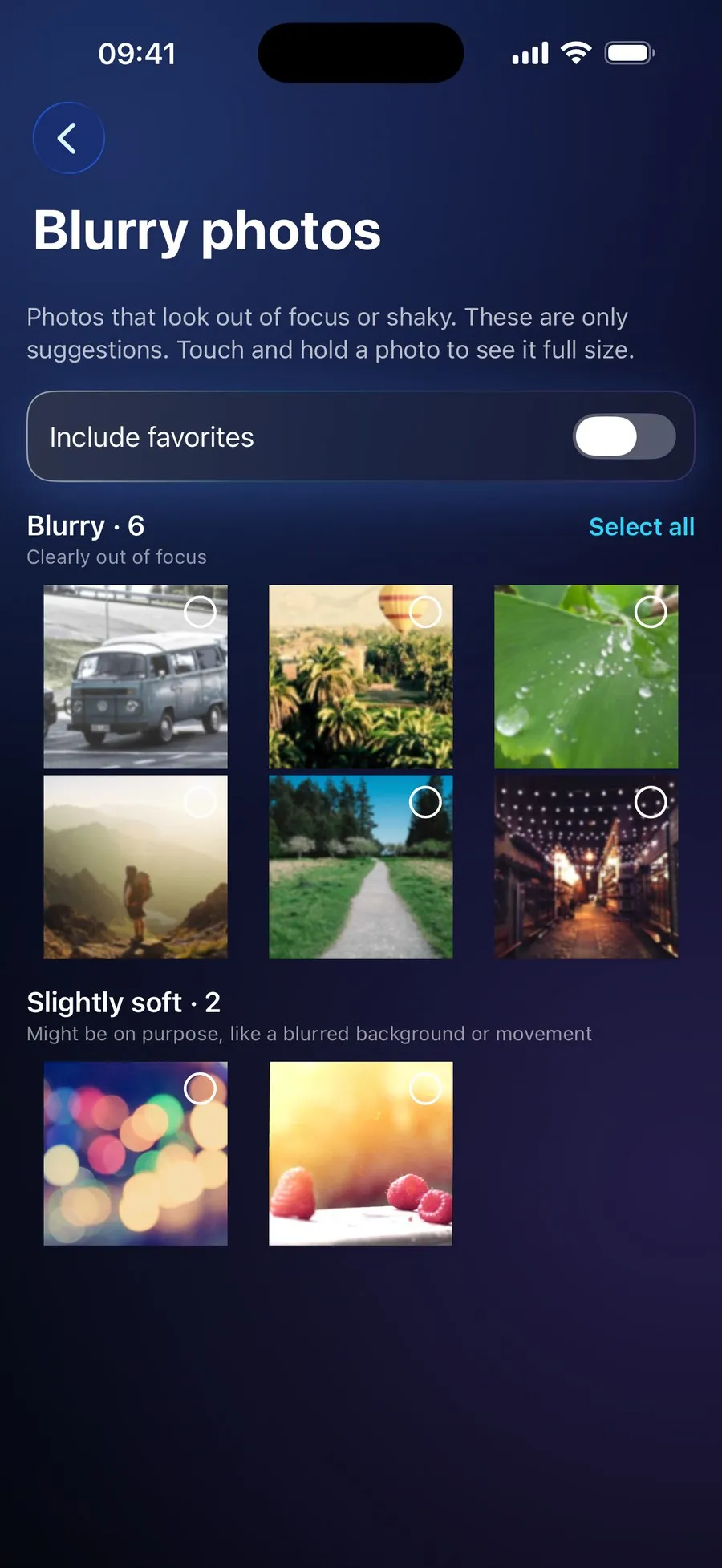
With RefreshMyPhone
RefreshMyPhone looks at every photo on your iPhone and lists the out-of-focus and shaken ones as suggestions. Only clearly blurred photos are ever selected for you; slightly soft ones, such as a blurred background on purpose, are listed apart.
Favourites are left out unless you include them, and you can touch and hold any photo to see it full size first.


On the App Store and Google Play (as Refresh: Photo & Video Cleanup). Free to scan; €9.99 a year unlocks every clean-up. The yearly plan starts with a 7-day free trial for new subscribers: on Google Play now, and on the App Store from 16 November.