
Beyond disk space
Maintenance jobs
Seven jobs macOS can do but does not put a button on. Each one is measured against your Mac before it is offered, and none of them touches your files.
Nothing runs until you press Run. Several ask for your administrator password — that prompt is macOS's own, and the app never sees what you type.
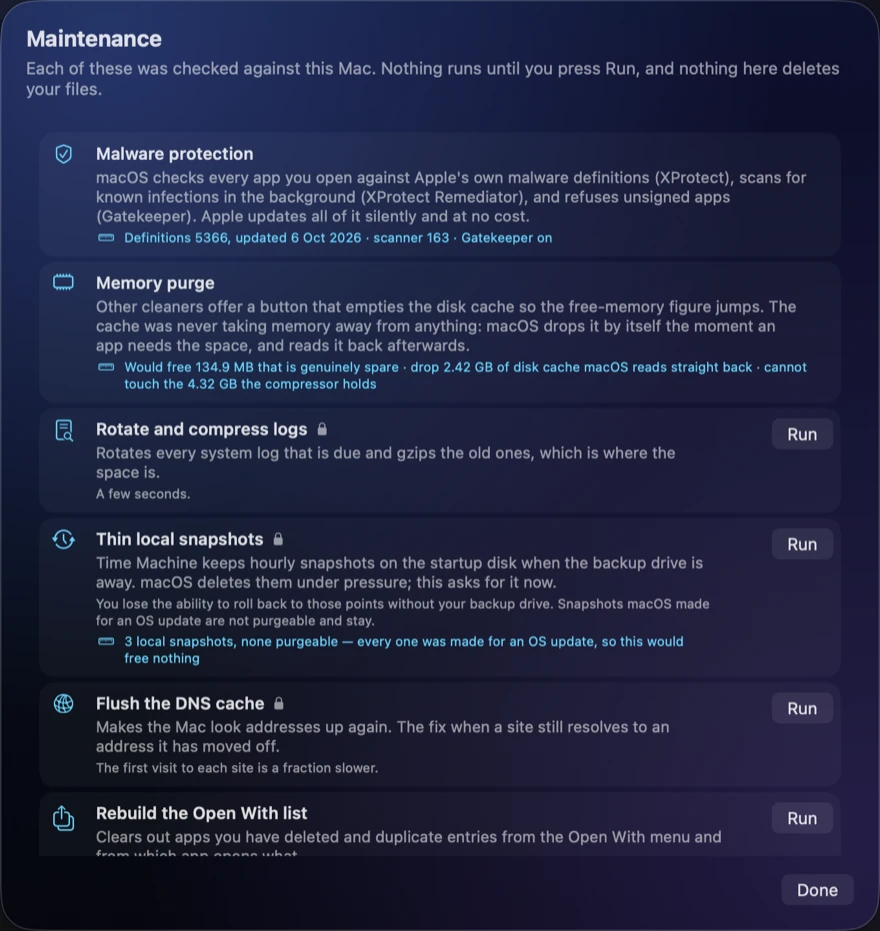
The seven
- Rotate and compress logs. Gzips the system logs that are due. This is where the space is.
- Thin local snapshots. Time Machine keeps hourly snapshots on the startup disk while the backup drive is away. It tells you how many exist and how much is actually purgeable first — often none, because snapshots macOS made for an OS update are not purgeable and stay. You lose the ability to roll back to those points without your backup drive. Snapshots are part of what Storage settings calls System Data.
- Flush the DNS cache. The fix when a site still resolves to an address it has moved off. The first visit to each site afterwards is a fraction slower.
- Rebuild the Open With list. Clears deleted apps and duplicate entries out of the menu, and out of which app opens what.
- Compact Mail's index. Rewrites the envelope database, which grows and never shrinks. Mail has to be closed.
- Rebuild the Spotlight index. For a Mac whose search has stopped finding things. It takes a while and the Mac is busy while it runs.
- Check the startup disk. Verifies the volume and reports. It does not repair.
The two it will not give you, and the two it cannot
Four more appear on the same screen, listed with the reason and no Run button. Two are things every rival ships:
- Run the periodic maintenance scripts. macOS no longer ships the
periodiccommand at all — there is no/etc/periodicand no launch daemon for it. Log rotation moved tonewsyslog, which is the first job above. - Repair disk permissions. macOS has protected and repaired system file permissions itself since El Capitan. There has been nothing for that button to do for ten years.
The other two are the memory purge and the malware scan, which are measurements here rather than buttons. Each has its own page: CPU and memory and malware protection.
Whether a restart is worth it
A restart gives back two things that stay given back, and both are disk space. macOS deletes the swap files at startup, and while it is running it shrinks them only slowly. And a running app can keep a deleted file open: it is gone from Finder but stays on the disk until that app lets go, which for a browser or Xcode can be weeks.
The Restart row adds the two up on your Mac and says whether it is worth it. When a restart would free a gigabyte or more, the main window says so too, with the breakdown, and if one app is holding most of it, the row names it, because quitting that app frees the same space without restarting. Each deleted file is counted once, however many apps have it open.
It does not tell you to restart to free memory. Apps load back what they need within minutes, so that figure is the same illusion as the RAM purge. Memory that was only sitting in swap is mentioned beside the disk figure, and how long the Mac has been up is shown as context, never as a reason. There is no Restart button: restarting closes everything you have open, so it is done from the Apple menu when it suits you.
The App Store edition has no Maintenance screen, because its other jobs need tools Apple's sandbox does not allow, so it shows the same figure in a Restart section at the top of its list. It counts the swap files only: the sandbox stops it seeing other apps' open files.
What to do next: see these numbers for your own Mac. Download RefreshYourMac free, or get it on the Mac App Store.
What it costs to have an app do this
| RefreshYourMac | CleanMyMac | MacKeeper | |
|---|---|---|---|
| Pay once | $24.99 | €119.95 on MacPaw’s store; $89.99 for CleanMyMac X on the Mac App Store | subscription only |
| Yearly | $14.99 a year, first 7 days free | $39.99/yr on the Mac App Store; €39.95/yr on MacPaw’s store | €71.40 for the first year, 1 Mac. Their page shows it against a €119.40 list price |
| Monthly | $1.99 a month | $9.99/mo | €10.95/mo |
| Account needed | No | Yes | Yes |
Before you pay anything, both versions give you 3 free scans. CleanMyMac and MacKeeper prices read from their own pages and the Mac App Store on 27 October 2026; the full comparison is at RefreshYourMac vs CleanMyMac and MacKeeper.
Frequently asked questions
Do I still need to repair disk permissions on a Mac?
No. macOS has protected and repaired system file permissions itself since El Capitan, so a repair-permissions button has had nothing to do for ten years.
Does macOS still run the periodic maintenance scripts?
macOS no longer ships the periodic command at all: there is no /etc/periodic and no launch daemon for it. Log rotation moved to newsyslog, which gzips the system logs that are due.
Is it safe to thin Time Machine local snapshots?
You lose the ability to roll back to those points without your backup drive. Count how many exist and how much is actually purgeable first: often none is, because snapshots macOS made for an OS update are not purgeable and stay.
When should I flush the DNS cache on a Mac?
When a site still resolves to an address it has moved off. Flushing the DNS cache fixes that, and the only cost is that the first visit to each site afterwards is a fraction slower.